The rail
Every project folder becomes a tab, most recently changed at the top. Opening one starts a terminal already in that directory, running whatever that project is set to start.
 TabDesk
Linux desktop · AI agents and terminals
TabDesk is a Linux desktop for AI coding agents. Every directory under your projects folder becomes a tab with its own real terminal, already running the CLI that project is set to start — or a plain shell, when what you want is a terminal. Each tab pulses while its terminal is writing and turns green once it falls quiet.
For the hours you have eight sessions going at once — three agents working through their tasks, a build watching itself, an ssh session on a switch in the corner. Eight things running don't need eight windows to watch. They need a rail that tells you which one wants you.
Features
Every project folder becomes a tab, most recently changed at the top. Opening one starts a terminal already in that directory, running whatever that project is set to start.
Each project picks what its terminal starts — Claude Code, Codex, Gemini CLI, opencode, Aider, Cursor Agent or a plain shell. The menu lists what is actually installed on the machine, and the choice is remembered with the project.
A background tab pulses while its terminal writes and turns green once it has been quiet for a moment. It reads the output itself, so it flags a finished agent, a finished build and a finished rsync alike.
Yellow, above the green ones, is the tab that has stopped on a question — a tool to approve, options to choose between. Claude Code reports that itself through a hook, so the session that cannot go on without you is the one you see first.
Show up to six panels at once and follow several sessions side by side. The panel you click takes the keyboard — as does the tab you select.
Each panel is an actual xterm reparented into the window, not a
browser emulation. Curses apps, colour, mouse reporting, ssh,
tcpdump and full-screen TUIs behave exactly as they do anywhere else.
Run the project next to the terminal — static HTML, Node, Python, Rust, Go. TabDesk finds the port it binds and renders it. Hover any element to see where it comes from in the source.
Colours are derived from your live GTK theme and the interface speaks your system language. Change either in system settings and TabDesk changes with it, without a restart.
How it looks
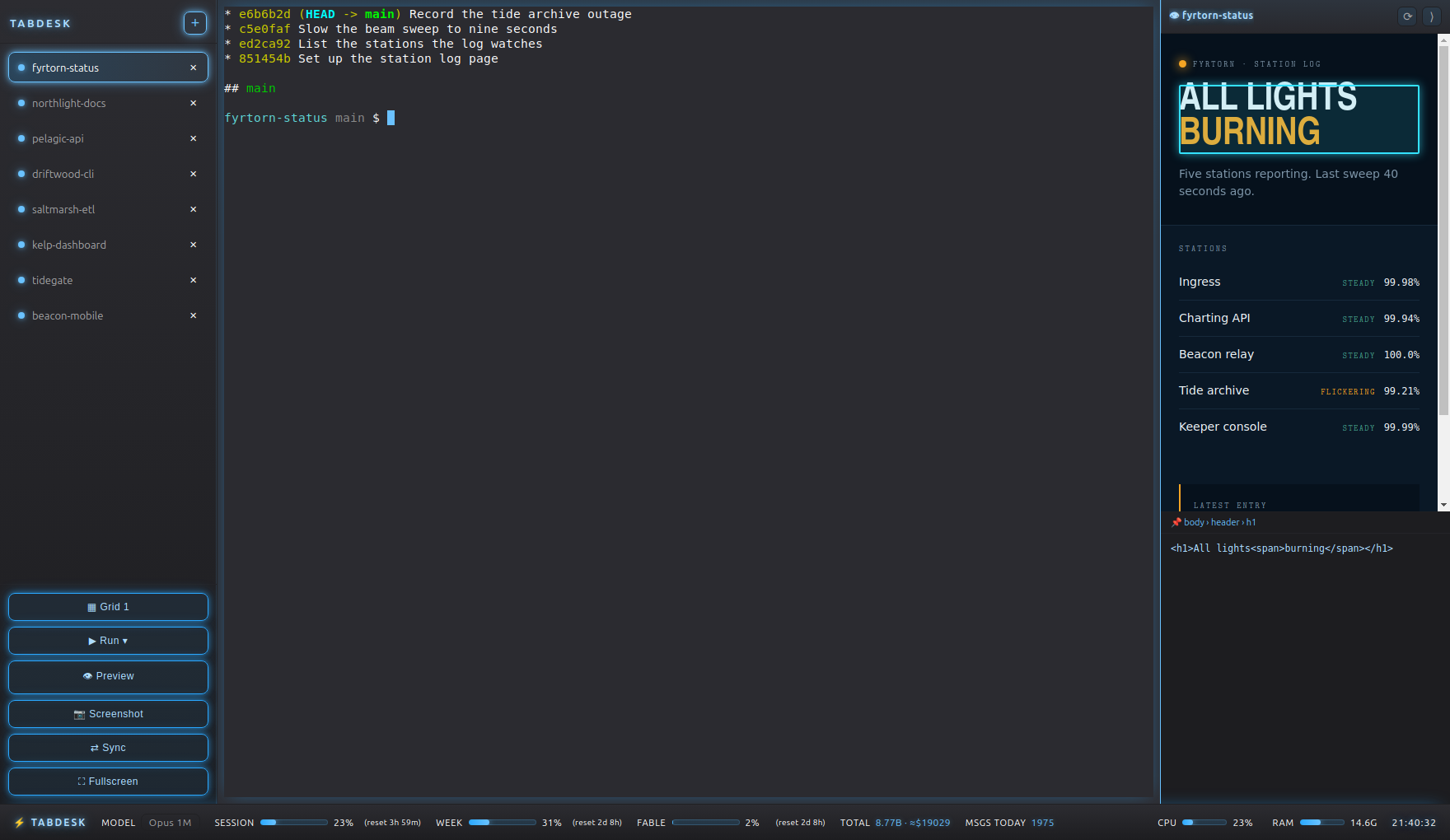
The rail on the left, terminals in the middle, the project itself in the dock on the right. Along the bottom: token usage if you run an agent that reports it, plus CPU, RAM and a clock.
Requirements
xterm and xdotool for the terminals, python3-gi for the GTK colours. All pulled in by the package..deb from an apt repository. Updates arrive with apt upgrade or through the chip in the system bar.Questions
TabDesk is a Linux desktop application for running AI coding agents across many projects. Every directory under your projects folder becomes a tab with its own real terminal — the agent CLI that project uses, or a plain shell — and a tab turns green when its terminal has been quiet for a moment, so you know which one is waiting for you.
Each project picks what its terminal starts: Claude Code, OpenAI Codex,
Gemini CLI, opencode, Aider, Cursor Agent, or a plain shell. TabDesk only
offers the ones actually installed on the machine, found by looking them
up on PATH, and remembers the choice per project.
No. The terminals are real xterm windows reparented into the
panels through X11, which Wayland does not allow. TabDesk requires a Linux
desktop running X11.
TabDesk watches how much each terminal writes. A background tab pulses while output is flowing and turns green once it has been quiet for a moment. Because it reads output rather than asking the program, it flags a finished agent, a finished build and a finished rsync the same way.
From a signed apt repository — the command is at the
bottom of this page. It works on Debian, Ubuntu and Kali; there is a
tarball for everything else. Updates then arrive with the rest of your
system, through apt upgrade.
It solves a neighbouring problem. tmux multiplexes sessions inside one
terminal; TabDesk is a desktop window that arranges several real
terminals, one per project, and tells you which of them has stopped
producing output. The panes are ordinary xterm windows, so
tmux runs inside them as usual.
Access
TabDesk installs from a signed apt repository, on Debian, Ubuntu and Kali. One command fetches the signing key, checks it, and adds the source:
curl -fsSL https://cdn.thern.io/tabdesk/install.sh | sudo bashReading a script before running it as root is a good habit, and this one is written to be read — the step-by-step instructions carry the key fingerprint to verify it against, the apt lines to paste by hand, and a plain tarball for machines that are not Debian-based.